[RTL8722CSM] [RTL8722DM] Scan available WiFi hotspots in the surroundings
Materials
Ameba x 1
Antenna x 1
Example
In this example, we use Ameba to scan available WiFi hotspots in the surroundings, and prints the SSID, encryption type, signal strength information of each detected hotspot.
First, make sure the correct Ameba development board is selected in Arduino IDE: “Tools” -> “Board” ->
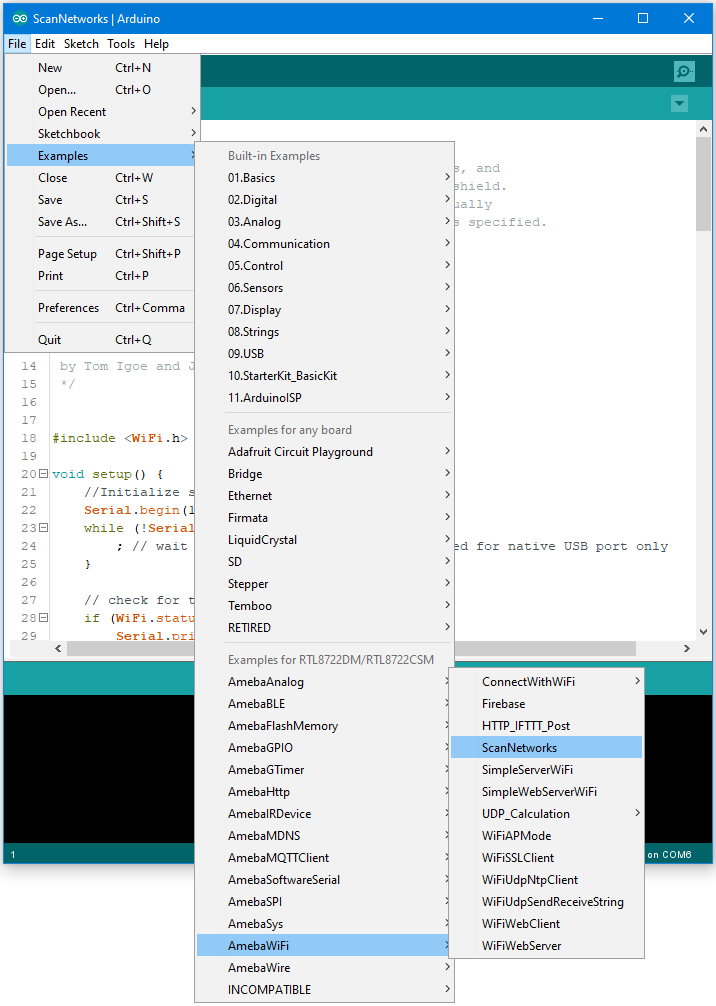
Open the “ScanNetworks” example in “File” -> “Examples” -> “AmebaWiFi” -> “ScanNetworks”:
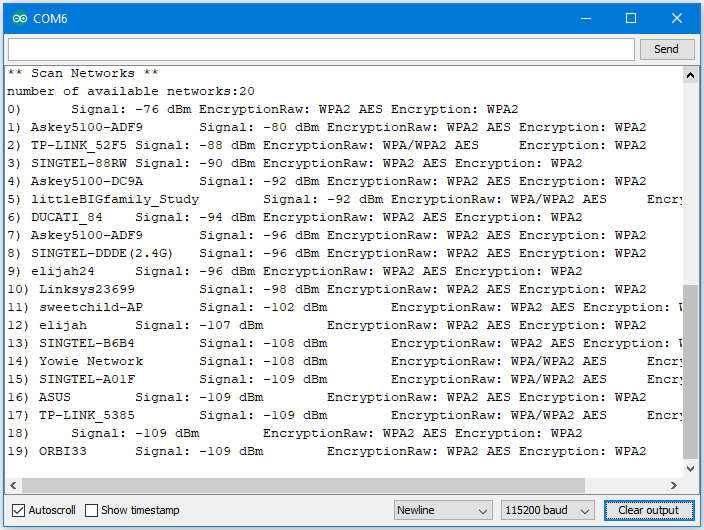
Then upload the sample code and press the reset button on Ameba. Afterwards, you can see “Scan Networks” message appears, with the detected WiFi hotspots and the information of each hotspot.
Code Reference
Comparison with Arduino
In the Arduino platform, we need to add an extra WiFi shield to be the WiFi module to realize the WiFi connection. And we must #include to use SPI to communicate with WiFi module.
However, Ameba is already equipped with WiFi module. Therefore, #include is not needed.